Video Analytics Explained: How It Works and EU Rules
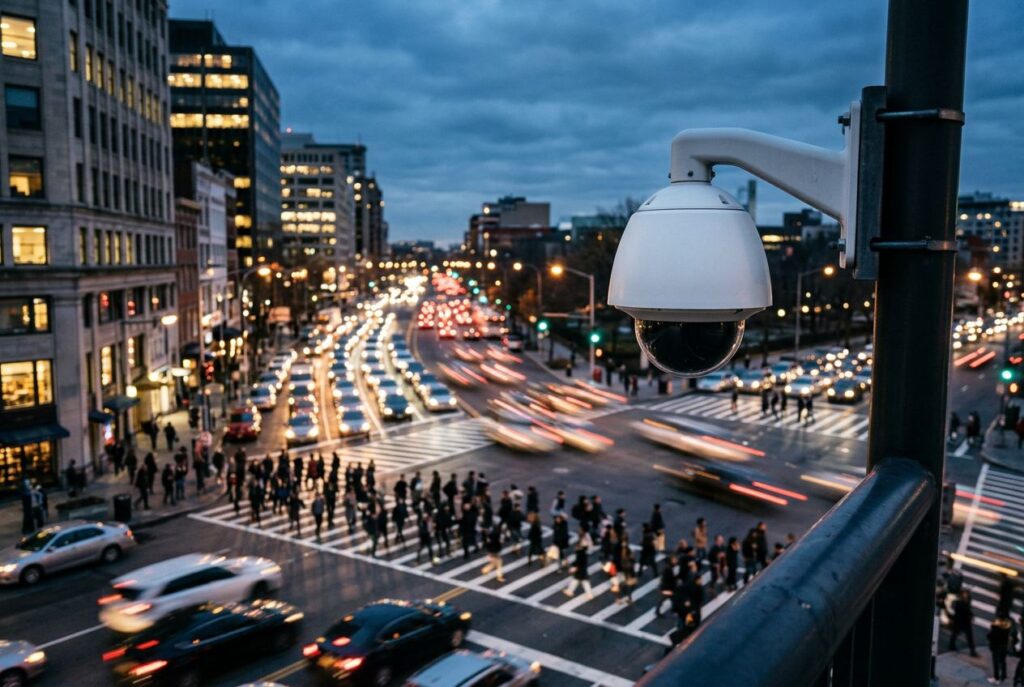
Video analytics is software that watches a video feed and automatically extracts meaning from it — counting people, flagging an object left behind, reading a license plate, or spotting a pattern that looks wrong — instead of leaving a human to stare at a monitor. It turns raw pixels into structured events and metadata that a system (or a person) can act on. This guide covers what video analytics actually detects, where the processing happens, how it plugs into the cameras and software you already run, what EU law says about using it on people, and where it earns its keep.
What is video analytics?
Video analytics — also called video content analysis (VCA), video content analytics, or "smart CCTV" in the security industry — is the use of computer vision and machine learning algorithms to automatically detect and interpret events in video, rather than relying on a person to watch the footage. It is a subset of computer vision, and by extension of multimodal AI, since many modern systems combine video with audio or metadata streams to make a decision.
The distinction that matters in practice is between raw video (pixels a person has to review) and video analytics (structured output: "person detected at 14:32 in zone A," "vehicle plate ABC-123 read at the gate," "object left unattended for 90 seconds"). That output is what makes the technology useful at scale — a single operator can supervise hundreds of cameras when the software does the watching and only raises the events worth a human's attention.
How video analytics works
Most systems follow the same basic pipeline: a camera captures frames, the software preprocesses them (stabilization, denoising, background subtraction), a detection or classification model identifies objects or motion of interest, a tracking stage follows those objects across frames, and a rules or event engine decides whether what it sees should trigger an alert, a count, or just a log entry. The functions built on top of that pipeline vary widely by vendor and use case:
| Function | What it does |
|---|---|
| Motion detection | Flags relevant movement against a fixed background scene |
| Object detection & classification | Determines the presence of a type of object or entity — a person, a vehicle, a package |
| Video tracking | Follows the location of a person or object across the frame over time, often against a defined reference grid |
| Recognition (face / license plate) | Identifies a specific person or reads a specific vehicle plate (Automatic Number Plate Recognition) |
| Dynamic masking | Blocks part of the video signal based on the content itself — commonly used for privacy |
| Tamper detection | Determines whether the camera or its output signal has been obstructed or interfered with |
| Egomotion estimation | Determines the camera's own location or movement by analyzing its output |
Most of the "anomaly detection" marketing around video analytics is really a combination of the rows above: an anomaly is usually defined as an object appearing where it shouldn't (intrusion), an object disappearing that shouldn't (theft), an object appearing that shouldn't (an unattended bag), or a count crossing a threshold (occupancy). The underlying computer-vision building blocks are the same ones listed in the table.
Edge vs. cloud processing
Where the analysis actually runs is a deployment decision with real trade-offs, and it is worth separating from the question of what the analytics does. For the general trade-offs between running inference locally versus in a data center, see our guide to edge AI vs. cloud AI; the points below are specific to video.
Edge processing
Edge processing runs the detection model on or near the camera — inside the camera itself, on an NVR, or on a small accelerator box sitting on the local network. This keeps raw video off the network and off third-party servers, which matters for both bandwidth and privacy, and it keeps latency low enough for real-time alerts. Hardware in this category ranges from maker-scale boards like the Raspberry Pi AI Camera and dedicated accelerator modules such as the ones compared in our M.2 AI accelerator roundup, up to more capable edge boards like the NVIDIA Jetson Orin Nano for sites running several concurrent detection models per camera.
Cloud processing
Cloud processing streams video (or already-compressed clips) to a remote server for analysis. It centralizes model updates, makes it easy to pool compute across many cameras, and simplifies running heavier models that would not fit on edge hardware — at the cost of continuous bandwidth use, dependence on network uptime, and sending footage off-site, which is exactly the point regulators focus on (see the privacy section below).
Hybrid approaches
Many commercial deployments split the difference: lightweight detection (motion, basic object presence) runs at the edge to filter out empty footage, and only the clips or metadata worth reviewing are sent to the cloud for heavier analysis, storage, or human review. This cuts both bandwidth and the amount of raw video that ever leaves the site.
| Factor | Edge | Cloud |
|---|---|---|
| Latency | Low — no round trip to a remote server | Higher — depends on network and server load |
| Bandwidth use | Low — only events/metadata typically leave the site | High — raw or compressed video usually has to be uploaded |
| Data exposure | Video can stay on the local network | Video is transmitted to and stored by a third party |
| Model updates | Pushed to each device individually | Centralized, applied instantly to all cameras |
| Compute ceiling | Limited by the accelerator on-site | Scales with the provider's infrastructure |
How video analytics fits into a VMS
In a commercial deployment, cameras rarely talk directly to an analytics application. Instead, a video management system (VMS) sits in the middle: it ingests streams from every camera, handles recording and storage, presents the operator interface, and either runs analytics itself or hands frames off to a separate analytics engine — at the edge on the camera, or centralized on a dedicated processing server. This is the "at-the-edge vs. centralized" split that the security industry has used for video analytics since the technology matured commercially in the mid-2000s.
Interoperability between cameras, encoders, and VMS software from different manufacturers is largely handled through open specifications published by industry bodies such as ONVIF, which maintains network interface specifications and conformance profiles that vendors implement and get tested against. Systems that don't conform to a shared standard typically require a vendor-specific plugin or SDK integration instead, which is a practical detail worth checking before selecting analytics software: it needs to either speak the same standard as your VMS or ship an integration for it by name.
Privacy and regulation: the EU AI Act and GDPR
Because video analytics frequently processes images of identifiable people, it sits squarely inside two overlapping EU legal frameworks, and the rules are not hypothetical — several provisions are already in force.
The EU AI Act
Regulation (EU) 2024/1689, the AI Act, sorts AI systems into four risk tiers. Since February 2025, it has banned outright several practices directly relevant to camera-based analytics: untargeted scraping of the internet or CCTV footage to build or expand facial-recognition databases, and real-time remote biometric identification for law enforcement in publicly accessible spaces. A ninth prohibited practice, covering AI systems that generate non-consensual sexual content, takes effect in December 2026 but is not video-analytics specific.
Below the outright ban, the Act classifies several video-analytics-adjacent uses as high-risk rather than prohibited — including remote biometric identification used retrospectively (for example, identifying a shoplifter after the fact from recorded footage), emotion recognition, and biometric categorization. High-risk systems face strict obligations — risk assessment, data-quality requirements, activity logging, documentation, and human oversight — but those obligations don't become enforceable until 2 December 2027, so a system being classified "high-risk" today does not yet mean the full compliance regime is already in effect for it.
GDPR and biometric data
Separately from the AI Act, Article 9 of the GDPR classifies "biometric data for the purpose of uniquely identifying a natural person" as a special category of personal data, processing of which is prohibited by default unless a specific exception applies — explicit consent, substantial public interest, or a handful of other narrow grounds. This is what makes facial-recognition-based analytics (which extracts a biometric template to identify a named individual) legally different from anonymous people-counting or heatmap analytics (which detects a shape or a track without identifying who it belongs to): only the former engages Article 9's special-category regime. This is a general summary of the published regulation text, not legal advice — anyone deploying identification-capable analytics on people in the EU should get that assessed by counsel for the specific system and jurisdiction involved.
Use cases
Security and public safety
This is video analytics' original commercial market: intrusion detection, virtual fencing around a perimeter, and person/vehicle detection replacing continuous human monitoring of CCTV banks. Crowd-management analytics has been deployed at large venues including London's O2 Arena and the London Eye. In law enforcement, software is used to search recorded footage for key events rather than having an investigator scrub through hours of video by hand — a workflow that matters given how often camera footage is part of an investigation in the first place.
Retail and business intelligence
Retailers use video analytics to build heatmaps of in-store movement for layout and marketing decisions, and to measure dwell time in front of a specific product or fixture. Item-removed and item-left detection are also common in this category, layering directly on the object-detection and tracking functions described above.
Traffic and transportation
License-plate recognition (ANPR) is one of the most mature commercial applications, used for tolling, parking enforcement, and access control. Vehicle counting and classification feed traffic-management systems, and — where cameras are combined with radar or LiDAR — the resulting sensor fusion pipeline can cross-check a visual detection against an independent sensor before it's treated as fact, which is exactly the redundancy argument that applies to autonomous vehicle perception more broadly.
Industrial and safety monitoring
Flame and smoke detection is a long-standing analytics function on industrial and warehouse cameras, using color, flicker pattern, and shape to flag a fire well before a conventional sensor would. The COVID-19 pandemic also drove a wave of purpose-built analytics for face-mask detection and social-distancing measurement, which is a useful illustration of how quickly new detection functions get built on the same underlying object-detection and tracking primitives once there's demand for them.
Accuracy and limitations
How well any given video analytics product actually performs is genuinely hard to state as a single number — it depends on the specific use case, the implementation, the camera placement and lighting, and the compute platform running the model. The standard ways to get an objective read are independent third-party benchmarking and controlled test deployments rather than a vendor's own marketing claims. In research, the field has long relied on shared benchmark datasets — TRECVID and the PETS benchmark data for tracking and virtual-fencing tasks, and UCF101 for action-recognition work — precisely because performance on one camera, one scene, and one lighting condition does not generalize to every deployment.
Frequently asked questions about video analytics
What is video analytics?
It's software that uses computer vision and machine learning to automatically detect and interpret events in video — objects, people, vehicles, motion, and specific behaviors — and turn them into structured alerts or metadata, instead of requiring a person to watch the footage continuously.
What's the difference between video analytics and regular video surveillance?
Plain video surveillance records footage for a person to review, live or after the fact. Video analytics adds a layer of automated interpretation on top of that footage — counting, detecting, tracking, recognizing — so that most of the footage never needs a human's attention at all, and only flagged events do.
Can I use an AI assistant to analyze a video?
General-purpose multimodal AI models can describe or summarize a video clip a user uploads, which is a genuinely different job from purpose-built video analytics. Production analytics systems run continuously on a live camera stream, with low-latency detection, tracking across frames, and rule-based alerting built for a specific deployment — capabilities a general chat assistant analyzing an uploaded clip is not designed to replicate.
Does video analytics need an internet connection?
Only if it's cloud-based. Edge-based video analytics runs the detection model on the camera, NVR, or a local accelerator, so it can keep working — and keep footage on the local network — without a connection to the outside internet. Cloud-based systems need a working connection to send video or clips for remote processing.
Are YouTube's video analytics accurate?
That's a different meaning of the term than the computer-vision analytics covered in this guide: YouTube Analytics is the platform's own dashboard of viewer-engagement metrics (views, watch time, audience retention), not a computer-vision system detecting objects or events in footage. As first-party platform data, it isn't independently audited the way a third-party analytics product would be benchmarked, but it measures a completely different thing than the video content analysis discussed above.
What is the best software for video analytics?
There isn't a single "best" answer — it depends on what you need to detect, whether you need edge or cloud processing, whether the software has to conform to an interoperability standard your cameras and VMS already use, and your budget and data-residency requirements. Those constraints narrow the field far more usefully than any general ranking would.
Recommended: