Best M.2 AI Accelerators: Hailo, Coral, and MemryX Compared
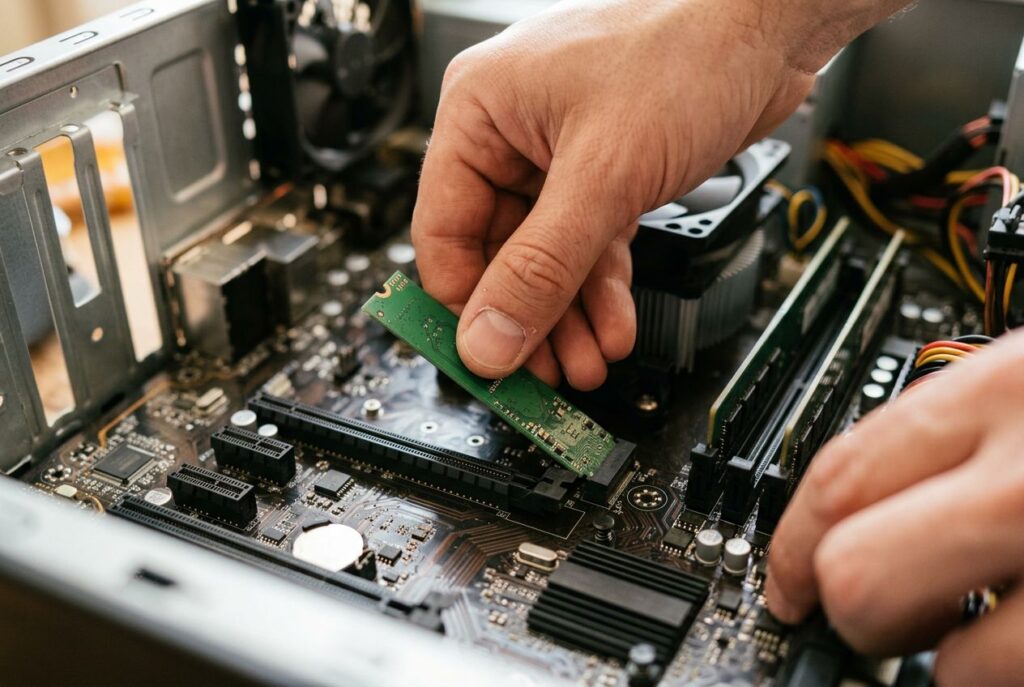
An M.2 AI accelerator is a credit-card-sized module — the same form factor used for laptop SSDs and Wi-Fi cards — that plugs into a free M.2 slot and adds a dedicated neural processing chip to a Raspberry Pi, mini-PC, or industrial computer. The three chips you'll actually find in stock are Hailo's Hailo-8 and Hailo-8L, Google's Coral Edge TPU, and MemryX's MX3, and they differ in more than raw TOPS: the physical M.2 key (M, B+M, or A+E), the PCIe lanes wired to it, and the software stack all decide whether a card will even boot in your hardware. This guide compares the chips that matter, explains the M.2 key confusion that trips up most first-time buyers, and walks through when an M.2 card makes more sense than a GPU.
- What is an M.2 AI accelerator?
- M.2 key types explained: M, B+M, and A+E
- Hailo-8 and Hailo-8L M.2 modules
- Google Coral M.2 Accelerator (Edge TPU)
- MemryX MX3 M.2 accelerator
- Compatibility pitfalls before you buy
- M.2 AI accelerator vs. GPU: which should you buy?
- How to choose an M.2 AI accelerator
- Frequently asked questions about M.2 AI accelerators
- What does an M.2 AI accelerator do?
- What's the difference between M-key, B+M-key, and A+E-key M.2 modules?
- Do M.2 AI accelerators work with Windows?
- Is an M.2 AI accelerator better than a GPU for edge AI?
- Do I need a heatsink for an M.2 AI accelerator?
- Can I use more than one M.2 AI accelerator at once?
What is an M.2 AI accelerator?
An M.2 AI accelerator is a small circuit board, built to the M.2 form factor originally designed for NVMe SSDs and Wi-Fi/Bluetooth cards, that carries a dedicated inference chip — an NPU (neural processing unit) or ASIC purpose-built for running trained neural networks — instead of flash memory or a radio. It talks to the host system over PCIe, not SATA or USB, so it needs a motherboard, single-board computer, or laptop with a free M.2 slot that actually exposes PCIe lanes to that socket.
Unlike a GPU, an M.2 accelerator generally can't train a model. It's an inference-only device: you train the network elsewhere (a workstation GPU or the cloud), compile it with the vendor's toolchain, and the M.2 card runs it in production at low power. That trade-off — no training, but very high inference-per-watt — is the entire reason this product category exists.
M.2 key types explained: M, B+M, and A+E
The single biggest source of "why won't this card fit" support tickets is the M.2 key — the notch pattern in the connector that determines which sockets a card can physically plug into. AI accelerators show up in three of them, and none of the three guarantee the same PCIe bandwidth from one vendor to the next.
| Key | Typical size | What it was designed for | PCIe lanes on real AI accelerator cards |
|---|---|---|---|
| M key | 2242 / 2260 / 2280 | NVMe SSDs (the socket with the most PCIe lanes wired to it) | Hailo-8 M.2 module, M-key variant: PCIe Gen 3.0 x4; MemryX MX3 M.2 module (M.2-2280-D5-M, Socket 3): PCIe Gen 3.0 x2 |
| B+M key | 2242 / 2280 | Cards designed to fit either a B-key or M-key socket | Hailo-8 M.2 module, B+M variant: PCIe Gen 3.0 x2; Coral M.2 Accelerator, B+M-key (M.2-2280-B-M-S3): PCIe Gen 2.0 x1 |
| A+E key | 2230 | Wi-Fi/Bluetooth combo cards, on the socket usually meant for wireless radios | Coral M.2 Accelerator, A+E-key (M.2-2230-A-E-S3): PCIe Gen 2.0 x1 |
Notice that "B+M key" means two different things on two different products: Hailo's B+M module gets a full PCIe Gen 3.0 x2 link, while Coral's B+M module only gets PCIe Gen 2.0 x1 — roughly a quarter of the raw bandwidth. The key tells you what socket the card fits, not how fast the link will be; that depends on the specific module and, just as much, on how the host board's M.2 slot is wired.
Hailo-8 and Hailo-8L M.2 modules
The Hailo-8 is Hailo's flagship edge AI processor: up to 26 TOPS (INT8) at roughly 3 TOPS per watt of power efficiency, according to Hailo's own product page for the M.2 module. It's also the chip inside the official Raspberry Pi AI HAT+ — Hailo's site links directly to that product as the way to buy the Hailo-8 module for a Pi 5. The entry-level Hailo-8L is the same architecture at a lower TOPS ceiling, used in the base AI HAT+ and in several of the standalone M.2 cards on the market.
The Hailo-8 M.2 module ships in three key variants — M, B+M, and A+E — with the M-key and B+M-key versions built on a 22×42 mm board that can be snapped down to the shorter 2230 length or extended to 2260/2280, and the A+E-key version fixed at 22×30 mm. Hailo lists Linux and Windows as supported host operating systems and TensorFlow, TensorFlow Lite, ONNX, Keras, and PyTorch as supported model frameworks, with an extended operating range of -40°C to 85°C. One buying pitfall worth flagging: Hailo's own site currently shows an end-of-life notice for the "Hailo-8 Commercial Version IC," replaced by an "Industrial Version IC" — worth checking which chip revision a specific listing actually ships before you design it into a long-lived product.
Disclosure: this article contains affiliate links. If you buy through them we may earn a small commission at no extra cost to you.

- Powered by 26 Tera-Operations Per Second (TOPS) Hailo-8 AI Processor. 2.5W typical power consumption.
- Scalable, enabling simultaneous processing of multi-streams & multi-models. Enabling real-time, low latency and high-efficiency AI inferencing on the edge devices.
- Supports TensorFlow, TensorFlow Lite, ONNX, Keras, Pytorch frameworks.
- Supports Linux and Windows.
- Supports the temperature range of -40°C to 85°C.
Google Coral M.2 Accelerator (Edge TPU)
Google's Coral Edge TPU is a much smaller chip on paper: 4 TOPS (INT8) at 2 TOPS per watt, drawing roughly 2 W in total, according to Google's official Coral M.2 documentation. It ships in the two key variants from the table above — A+E key at M.2-2230 and B+M key at M.2-2280 — both using a single-lane PCIe Gen 2.0 link, and both requiring Google's own PCIe driver, which historically supports 64-bit Debian 10 or Ubuntu 16.04-and-newer on x86-64 or ARMv8 hosts rather than Windows. Google's own benchmark for the module cites MobileNet V2 running at close to 400 FPS.
One thing worth flagging for buyers: the dedicated coral.ai product pages for the M.2 accelerator now redirect to a general Coral platform page, and the module's original PDF datasheet links no longer resolve on Google's own domain (we could only verify the specs above through the datasheet as archived by third-party distributors). That's not proof the hardware is discontinued — resellers still list and ship it — but it's a reason to confirm current availability and support directly with a distributor before committing a design to it.

- High-Performance ML Accelerator: Integrates Edge TPU, delivering 4 TOPS (int8) peak performance for machine learning inference tasks.
- Strong Compatibility: Supports M.2 A+E key interface for easy integration into existing systems.
- Low Power Design: Provides 2 TOPS per watt, ideal for embedded and energy-efficient applications.
- Wide OS Support: Compatible with Linux (Debian 10/Ubuntu 16.04+) and Windows 10 (64-bit).
- Industrial-Grade Reliability: Operating temperature range of -20°C to +85°C, suitable for harsh environments.
MemryX MX3 M.2 accelerator
MemryX takes a different approach: its M.2 module packs four MX3 chips that present to software as a single logical accelerator. Each MX3 chip is rated up to 6 TFLOPS at 1 GHz (MemryX publishes this in TFLOPS with Group-BF16 activations and INT8/INT4 weights, not the INT8 TOPS figure Hailo and Coral use, so the numbers aren't directly comparable), and MemryX's own datasheet lists typical power draw of 0.5–3 W per chip depending on workload — which, done out on the datasheet's own numbers, works out to roughly 2–12 TFLOPS per watt across that range.
The module itself uses the M-key form factor (M.2-2280-D5-M, "Socket 3"), a PCIe Gen 3.0 x2 host interface, 3.3 V input, and supports ARM, x86, or RISC-V hosts, with a -40°C to 85°C operating range and CE/FCC Class A/RoHS certification, per MemryX's M.2 module datasheet. Internally, PCIe also connects the four chips to each other, and MemryX says the same chip can be scaled up to 16 units on a single host interface on custom board designs — the standard M.2 card is the four-chip version.

- High-Performance AI Processing: The MX3 is designed to handle the most demanding AI computer vision workloads, delivering exceptional performance and efficiency.
- Flexible Integration: The MX3 can be easily integrated into your existing systems via its M.2 M-key form factor and support for Linux operating systems.
- Energy Efficient: The MX3 is designed to provide high performance while minimizing power consumption.
- Comprehensive Software Development Kit (SDK): The MX3 is supported by a comprehensive SDK that simplifies development and deployment.
- Hardware compatability: The MX3 is compatible with the PCI-SIG M.2 M-key 2280 Specification. It can be used with the Raspberry Pi 5 with a M-key 2280 HAT.
- Software and Documentation can be accessed at the MemryX developer website
Compatibility pitfalls before you buy
- The key fits, but the lanes might not be there. Many laptop and mini-PC M.2 sockets sold as "Wi-Fi slots" (A+E key) only wire out PCIe x1 or, on older boards, no PCIe at all — just USB 2.0 for the radio. Check your host's manual for the actual PCIe lane count on the slot you plan to use, not just the key shape.
- Windows support is not universal. Hailo explicitly lists Windows alongside Linux; Coral's PCIe/M.2 driver, per Google's documentation, targets Debian- and Ubuntu-based Linux on x86-64 or ARMv8 rather than Windows.
- The accelerator only runs what its compiler supports. Each vendor requires converting a trained model through its own toolchain — Hailo's Dataflow Compiler, Google's Edge TPU Compiler (quantized TensorFlow Lite only), or MemryX's NeuralCompiler — and each supports a different subset of operators. A model that runs fine on a GPU can fail to compile, or silently fall back to slower layers, on any of these chips.
- Sustained inference generates heat even at a few watts. Google's own guidance for the Coral module describes power throttling tied to the Edge TPU's internal temperature sensor; in an enclosed case with no airflow, a card rated for a wide operating temperature range can still throttle well before that ceiling.
- "Compatible with Raspberry Pi 5" can mean different things. Some M.2-to-Raspberry-Pi kits bundle an adapter board because the Pi 5 exposes PCIe through a separate connector, not a native M.2 socket — read the listing closely to see whether the adapter is included or sold separately.
M.2 AI accelerator vs. GPU: which should you buy?
The honest answer is that they solve different problems. A GPU — including a compact one like the NVIDIA Jetson Orin Nano — is a general-purpose parallel processor: it can train models, run them at higher precision (FP16, BF16, FP32) as well as quantized INT8, and work natively with the full PyTorch/TensorFlow ecosystem without a separate compilation step for every operator. An M.2 accelerator is a fixed-function ASIC: inference only, quantized precision, and a much narrower, vendor-defined list of supported operations, in exchange for far lower power draw per inference.
| M.2 AI accelerator (Hailo/Coral/MemryX) | GPU (e.g., Jetson Orin Nano) | |
|---|---|---|
| Training | Not supported — inference only | Supported (with enough memory/time) |
| Precision | Quantized: INT8/INT4 (MemryX also BF16 activations) | FP32/FP16/BF16 and INT8 |
| Model deployment | Requires vendor-specific compiler; limited operator support | Native framework support; broader operator coverage |
| Power draw | Roughly 2–12 W depending on chip and workload | Higher, but delivers general-purpose compute alongside AI |
| Host requirement | Free M.2 slot with the right key and enough PCIe lanes | Its own board/module, typically with more RAM and I/O |
If your project already runs on a Raspberry Pi 5 or a small industrial PC and needs to add object detection or a similar vision model without a redesign, an M.2 card is the lower-friction, lower-power path — see our Raspberry Pi AI kits buyer's guide for how these modules pair with Pi hardware specifically. If you need to train on-device, run larger or more varied models, or want the broadest software compatibility, a GPU-based platform is the better fit; our Raspberry Pi AI HAT+ vs. Jetson comparison and best GPUs for deep learning guide cover that side of the decision in more depth.
How to choose an M.2 AI accelerator
- Confirm the physical key and PCIe lanes on your host first. This eliminates most of the "it doesn't fit" or "it's much slower than advertised" outcomes before you spend anything.
- Match TOPS to the model, not the project name. A single lightweight detection model can run comfortably on a 4 TOPS Coral card; multiple simultaneous streams or heavier models point toward the 26 TOPS Hailo-8 or a multi-chip MemryX MX3 module.
- Check the OS and driver story for your platform. If you're deploying on Windows, that alone narrows the field toward Hailo's modules over Coral's PCIe driver.
- Plan for a heatsink or airflow if the case is sealed. None of these chips need active cooling at their rated power, but a fully enclosed project box with no airflow is a different thermal environment than an open dev board.
- If you're starting from a bare Raspberry Pi 5, our Raspberry Pi 5 projects roundup and the AI kits guide linked above cover the adapter-board question and the first models worth trying.
A few current listings worth a look, pulled directly from Amazon's live catalog for "m.2 ai accelerator":

- ✅Powered by 26 Tera-Operations Per Second (TOPS) Hailo-8 AI Processor. 2.5W typical power consumption
- ✅Scalable, enabling simultaneous processing of multi-streams & multi-models
- ✅Enabling real-time, low latency and high-efficiency AI inferencing on the edge devices
- ✅Supports TensorFlow, TensorFlow Lite, ONNX, Keras, Pytorch frameworks
- ✅Supports Linux and Windows. Supports the temperature range of -40°C to 85°C
- ❤️Rich WiKi Resources❤️ We provide official Wiki resources, please contact us for more information.
- High-Performance AI Processing: The MX3 is designed to handle the most demanding AI computer vision workloads, delivering exceptional performance and efficiency.
- Flexible Integration: The MX3 can be easily integrated into your existing systems via its M.2 M-key form factor and support for Linux operating systems.
- Energy Efficient: The MX3 is designed to provide high performance while minimizing power consumption.
- Comprehensive Software Development Kit (SDK): The MX3 is supported by a comprehensive SDK that simplifies development and deployment.
- Hardware compatability: The MX3 is compatible with the PCI-SIG M.2 M-key 2280 Specification. It can be used with the Raspberry Pi 5 with a M-key 2280 HAT.
- Software and Documentation can be accessed at the MemryX developer website

- Powered by 26 Tera-Operations Per Second (TOPS) Hailo-8 AI Processor.
- 2.5W typical power consumption
- Enabling real-time low latency and high-efficiency AI inferencing on the edge devices
- Supports TensorFlow TensorFlow Lite, ONNX, Keras, Pytorch frameworks
- Supports Linux and Windows.
Frequently asked questions about M.2 AI accelerators
What does an M.2 AI accelerator do?
It adds a dedicated inference chip to a host device over the M.2/PCIe interface, so the host's own CPU doesn't have to run neural network math. The host still handles the camera pipeline, application logic, and any pre/post-processing; the M.2 card only executes the compiled model.
What's the difference between M-key, B+M-key, and A+E-key M.2 modules?
The key is the notch pattern that determines which physical sockets a card fits. M-key sockets typically expose the most PCIe lanes (designed for SSDs); A+E-key sockets were designed for Wi-Fi/Bluetooth cards and often carry fewer lanes; B+M-key cards are built to fit either socket type, but the actual PCIe bandwidth still depends on the specific product — see the key comparison table above.
Do M.2 AI accelerators work with Windows?
It depends on the chip. Hailo lists Windows alongside Linux as a supported host OS for the Hailo-8 M.2 module. Google's Coral PCIe driver, per its own documentation, targets Debian- and Ubuntu-based Linux distributions on x86-64 or ARMv8 rather than Windows.
Is an M.2 AI accelerator better than a GPU for edge AI?
Neither is universally better. An M.2 accelerator draws far less power per inference and needs only a spare M.2 slot, but it can't train models and supports a narrower set of quantized operations through a vendor-specific compiler. A GPU can train and run a wider range of models and precisions but costs more power and, usually, a dedicated board.
Do I need a heatsink for an M.2 AI accelerator?
Not necessarily at the chip's rated power draw, but sustained inference in a sealed enclosure with no airflow can trigger the temperature-based power throttling that Google documents for the Coral module — and the same physics applies to any of these chips. If your project runs continuously in a closed case, plan for at least passive airflow.
Can I use more than one M.2 AI accelerator at once?
On the chip side, MemryX's architecture is explicitly designed to scale a single host interface across multiple chips (its own M.2 module already does this internally, with four MX3 chips presented as one accelerator). Whether you can add a second, separate M.2 card is mostly a question of your host board: it needs more than one usable M.2/PCIe slot, or enough free lanes split across them, which is the actual limiting factor in most builds rather than anything in the accelerator itself.
For the platform on the other side of this decision, see our guide to the NVIDIA Jetson Orin Nano, or compare full kits in our Raspberry Pi AI kits buyer's guide.
Last update 2026-10-01. Price and product availability may change.
Recommended: