12 Raspberry Pi 5 Projects Worth Building in 2026
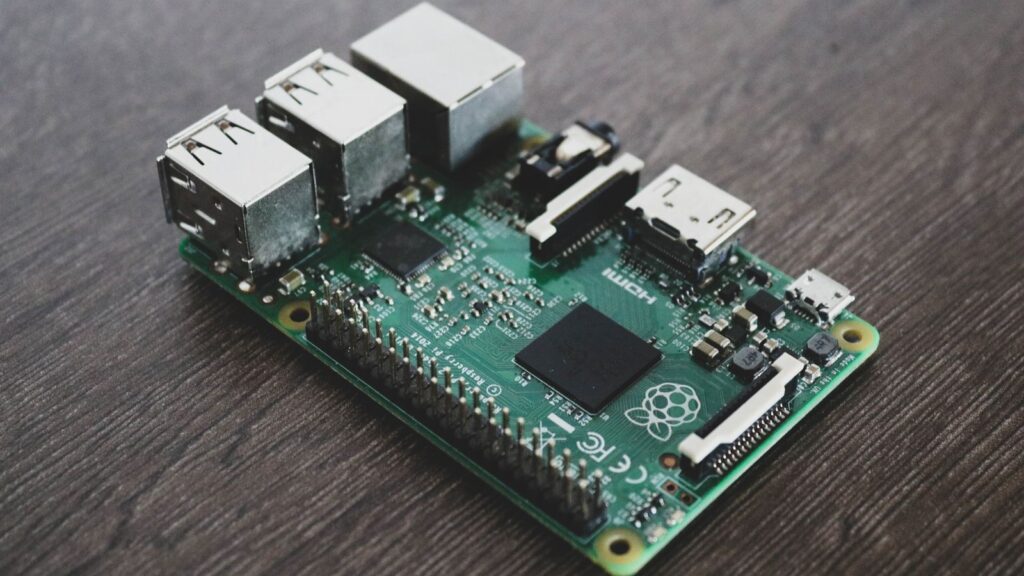
The Raspberry Pi 5 is the first Pi that feels like a proper computer — a 2.4 GHz quad-core CPU, up to 16 GB of RAM, PCIe storage and, with the AI Kit or AI HAT+, a genuinely capable edge AI machine. That combination has turned the classic "what should I build with it?" question into a much more interesting one. Below are 12 Raspberry Pi 5 projects worth building in 2026, ordered from easy weekend builds to advanced projects that flex the board's AI hardware, with the difficulty level and the hardware you need for each.
Disclosure: this article contains affiliate links. If you buy through them we may earn a small commission at no extra cost to you.
A quick note on how this list is ordered: projects 1–4 need little more than the board, an SD card and patience. Projects 5–9 add storage, cameras or an AI accelerator. Projects 10–12 are where the Pi 5 earns its keep as an edge computing platform — robotics, sensor fusion and clustering. Pick the one that matches your comfort level and work upward.
- 1. Network-wide ad blocker with Pi-hole
- 2. 4K media center with Kodi or Plex
- 3. Retro gaming console
- 4. DIY weather station
- 5. Home NAS with NVMe storage
- 6. Private smart home hub with Home Assistant
- 7. Smart vision projects with the Raspberry Pi AI Camera
- 8. Surveillance camera with on-device detection
- 9. Local LLM server with the AI HAT+
- 10. Basic sensor fusion rig with an IMU
- 11. Autonomous robot rover
- 12. Raspberry Pi cluster
- Before you build: accessories that save the day
- Frequently asked questions
1. Network-wide ad blocker with Pi-hole
What it does: Pi-hole turns your Pi into a DNS sinkhole that blocks ads and trackers for every device on your network — phones, smart TVs and consoles included, with no browser extensions. It is the canonical first Pi project for a reason: a 30-minute install, a slick web dashboard, and an immediately visible result (block lists routinely filter 10–20% of all DNS requests on a typical home network).
A Pi 5 is honestly overkill for DNS filtering alone, which is exactly why it's a great first project: you can later stack a VPN (WireGuard), local DNS records and network monitoring on the same board without breaking a sweat.
Difficulty: Easy · Hardware: Raspberry Pi 5 (2–4 GB is plenty), microSD card, official 27 W USB-C power supply, Ethernet cable.
If you're starting from zero, a complete starter kit saves you from ordering the case, cooler and power supply separately — the Pi 5's active cooler is not optional if you plan to keep it running 24/7:

- Includes Raspberry Pi 5 with 2.4Ghz 64-bit quad-core CPU (8GB RAM)
- Includes 128GB Micro SD Card pre-loaded with 64-bit Raspberry Pi OS, USB MicroSD Card Reader
- CanaKit Turbine Black Case for the Raspberry Pi 5
- CanaKit Low Noise Bearing System Fan
- Mega Heat Sink - Black Anodized
- CanaKit 45W PD Power Supply for the Raspberry Pi 5

- CanaKit Raspberry Pi 5 Essentials Starter Kit

- Pi5 8GB Pack: RasTech Pi 5 8GB kit includes 1 x Pi5 8GB board ,1 x 64GB Card, 2 x Card Readers,1 x Active Cooler,1 x Case for Pi5, 2 x 4K Micro HD Out Cable,1 x GaN 27W 5A USB-C Power supply,1 x Screwdriver and 1 x instructions.
- Pi5 8GB Board: The Pi5 board is equipped with a 64-bit quad-core Arm Cortex-A76 processor running at 2.4GHz and an 800MHz VideoCore VII GPU with support for OpenGL ES 3.1 and Vulkan 1.2, which delivers a significant increase in graphics performance. Dual HD Out 4Kp60 display outputs and a built-in dual 4-channel MIPI camera/display transceiver provide state-of-the-art camera support. The Pi 5 offers a 2-3 times increase in CPU performance compare to Pi4.
- Important Graphics Features: Equipped with an 800MHz VideoCore VII GPU and providing better graphics performance, suitable for multimedia applications,gaming,and graphics intensive tasks.Provides 1 UART interface,1 card slot that supports high-speed operation, 2 USB. 3 0.5 ports that support synchronous 0Gbps operation,2 USB 2.0 port ports,2 4Kp60 display outputs that support HDR.Built-in dedicated dual 4-channel 1Gbps MIPI DSI/CSI connectors,triple the total bandwidth.
- Cooling Kit for Pi 5: Compatible with Active Cooler for Raspberry Pi5, It can provide Pi 5 board with better cooling effect in using. The Case can accurately access usb-c power jack,Micro HD Out ports, usb ports, Ethernet jack, card slot, power button, 4-lane MIPI DSI/CSI connectors and so on, and it also supports installation of cooling fan.
- 64GB Card Kit and GaN 27W USB-C Power Supply: With extra 64GB card to store more files and card readers for multiple medium, keep better performance for Raspberry Pi 5, 27W USB C Power Supply is Compatible with Pi5 8GB, offers a variety of output voltage options, including 5.1V at 5A, 9.0V at 3.0A, 12.0V at 2.25A, and 15.0V at 1.8A, providing for different device requirements.
2. 4K media center with Kodi or Plex
What it does: streams and plays your movie and music library on the living-room TV. The Pi 5 decodes 4K HEVC at 60 fps in hardware, drives dual 4K displays over micro-HDMI, and runs LibreELEC (a minimal Kodi OS) or acts as a Plex/Jellyfin client. Compared with a locked-down streaming stick you get full codec control, no ads, and local playback from a USB drive or your NAS (see project 5).
Difficulty: Easy · Hardware: Pi 5 (4 GB), microSD, case with cooling, micro-HDMI to HDMI cable, remote or CEC-compatible TV.
3. Retro gaming console
What it does: emulates decades of consoles — from NES and Mega Drive up to Dreamcast, PSP and a large chunk of the GameCube library, which older Pis could never handle. RetroPie, Batocera and Lakka all support the Pi 5, and setup is mostly flashing an image and copying game files you legally own. Add two USB or Bluetooth gamepads and you have a couch multiplayer machine on a small budget.
Difficulty: Easy · Hardware: Pi 5 (4–8 GB), microSD or (better) NVMe HAT for load times, gamepads, HDMI cable, cooled case.
4. DIY weather station
What it does: logs temperature, humidity, barometric pressure and air quality, then graphs everything on a local dashboard. It's the classic gateway into physical computing: you wire a BME280 or BME688 sensor to the Pi's GPIO header, read it with a few lines of Python, and push the data to InfluxDB + Grafana or straight into Home Assistant (project 6). Outdoor variants add an anemometer and rain gauge.
Beyond the dashboard, this project quietly teaches you I2C, sensor polling and time-series data — skills you'll reuse in the sensor fusion project later in this list.
Difficulty: Easy–Moderate · Hardware: Pi 5, BME280/BME688 sensor breakout, jumper wires, optional e-ink or small LCD display for a standalone readout.
5. Home NAS with NVMe storage
What it does: centralizes your files, backups and media on your own network instead of someone else's cloud. The Pi 5 is the first Pi that makes real sense as a NAS: its PCIe 2.0 lane takes an NVMe SSD via an M.2 HAT, and Gigabit Ethernet gets saturated with ease. Install OpenMediaVault or run Samba directly, add scheduled backups with rsync or Syncthing, and point your media center (project 2) at it.
Difficulty: Moderate · Hardware: Pi 5 (8 GB recommended), M.2 NVMe HAT + SSD (or powered USB 3.0 drives), Ethernet, always-on power and cooling.
6. Private smart home hub with Home Assistant
What it does: runs Home Assistant OS as a fully local smart home brain — lights, thermostats, presence detection and automations that keep working when your internet doesn't, and that never ship your household data to a vendor cloud. The Pi 5 handles hundreds of entities plus add-ons (Zigbee2MQTT, Node-RED, local voice assistants) without strain, and the project scales with you for years.
This is also the natural hub for other projects on this list: the weather station feeds it sensor data and the AI security camera (project 8) feeds it detection events.
Difficulty: Moderate · Hardware: Pi 5 (8 GB), NVMe or high-endurance microSD, Zigbee/Z-Wave USB dongle depending on your devices.
7. Smart vision projects with the Raspberry Pi AI Camera
What it does: gives your Pi eyes that think. The Raspberry Pi AI Camera runs neural networks (object detection, pose estimation, classification) directly on its Sony IMX500 sensor, so the Pi 5's CPU stays free for your application logic. Classic builds: a bird-feeder camera that identifies species, a parking-spot monitor, a gesture-controlled interface, or a people counter for a workshop.
We've covered the module in depth — specs, setup and first projects — in our Raspberry Pi AI Camera guide, which is the best place to start if this project is the one that hooks you.
Difficulty: Moderate · Hardware: Pi 5, Raspberry Pi AI Camera (IMX500), camera cable for Pi 5's smaller FPC connector, tripod or mount.
8. Surveillance camera with on-device detection
What it does: a security camera that alerts you when it sees a person or a car — not every time a branch moves. Run Frigate NVR on the Pi 5 with a Camera Module 3 (or RTSP feeds from existing IP cams) and let an AI accelerator handle real-time object detection. Detections land in Home Assistant as events you can automate: lights on, notification sent, clip saved to the NAS.
With the AI Kit or AI HAT+ attached, the Pi 5 comfortably processes multiple camera streams with sub-100 ms detection — a task that used to require a desktop GPU.
Difficulty: Moderate · Hardware: Pi 5 (8 GB), Camera Module 3 or IP cameras, Hailo-based AI Kit / AI HAT+, NVMe storage for recordings.
9. Local LLM server with the AI HAT+
What it does: runs a private chatbot and text assistant entirely on your desk. With 8–16 GB of RAM the Pi 5 runs quantized small language models (Llama 3.2 3B, Phi-3, Gemma 2 2B) through Ollama at usable speeds, and the 26 TOPS AI HAT+ offloads vision models so you can pair an LLM with image understanding. Add Open WebUI and you have a ChatGPT-style interface that never sends a byte off your network.
Temper expectations: a Pi 5 serves one user with small models, not a family of heavy users with 70B-parameter ones. If you want faster tokens and bigger models, our Raspberry Pi AI HAT+ vs Jetson comparison breaks down exactly when it's worth stepping up. And if you're assembling the AI stack from scratch, start with our roundup of the best Raspberry Pi AI kits.
Difficulty: Moderate–Advanced · Hardware: Pi 5 16 GB, AI HAT+ (13 or 26 TOPS), NVMe SSD for model storage, active cooling — LLM inference runs the SoC hot.
10. Basic sensor fusion rig with an IMU
What it does: teaches you the single most transferable skill in robotics and drones: combining noisy sensors into one trustworthy estimate. Wire a 9-DoF IMU (accelerometer + gyroscope + magnetometer, e.g. a BNO085 or MPU-9250) to the Pi 5 over I2C, stream raw data, and implement a complementary filter — then graduate to a Kalman filter — to compute stable orientation in real time. Visualize the fused output as a rotating 3D cube and you'll see why fusion beats any single sensor: the gyro drifts, the accelerometer jitters, the fused estimate stays put.
It's a deceptively small build — a handful of inexpensive parts on top of the Pi — that gets you the exact math running inside every flight controller and AR headset.
Difficulty: Advanced · Hardware: Pi 5, 9-DoF IMU breakout (BNO085, ICM-20948 or MPU-9250), jumper wires, breadboard.
11. Autonomous robot rover
What it does: puts projects 7 and 10 on wheels. A Pi 5 rover combines a motor driver HAT, a camera and an IMU into a robot that can follow lines, avoid obstacles or — with the AI Kit on board — detect and follow objects in real time. Robot chassis kits handle the mechanics; your work is the software stack, and ROS 2 runs natively on the Pi 5 if you want the industry-standard framework rather than raw Python.
When your ambitions grow into SLAM, depth cameras and multi-sensor autonomy, that's the point where a dedicated embedded AI board starts to pay off — see our NVIDIA Jetson Orin Nano guide for what the next tier up looks like.
Difficulty: Advanced · Hardware: Pi 5, robot chassis kit with motors, motor driver HAT, camera module, IMU, ultrasonic or ToF distance sensor, battery pack (UPS HAT recommended).
12. Raspberry Pi cluster
What it does: turns three or four Pi 5s into a miniature datacenter for learning Kubernetes (K3s), Docker Swarm or distributed computing. Nothing teaches container orchestration, node failure and load balancing like physically pulling the power on one of your own nodes and watching workloads reschedule. It's the standard homelab path for DevOps skills, and a cluster of 16 GB Pi 5s packs a surprising amount of aggregate compute into a bookshelf.
Difficulty: Advanced · Hardware: 3–4× Pi 5, cluster case or rack, Gigabit switch, PoE+ HATs or multiple power supplies, NVMe or high-endurance SD per node.
Before you build: accessories that save the day
Two hard-earned lessons apply to every project above. First, the Pi 5 wants the official 27 W power supply — undervoltage causes the kind of random instability that will have you debugging software for a bug that lives in your cable. Second, cooling is mandatory for sustained loads: the active cooler or a well-ventilated case keeps the SoC from throttling during LLM inference, video decoding or compile jobs. Cases, coolers, NVMe HATs and quality microSD cards are cheap insurance:

- 7 inches, 800x480 pixels, IPS type, wide viewing angle, capacitive touchscreen, enjoy smooth touch response and excellent clarity for all your Raspberry Pi projects.
- Specially designed, simply connect to your raspberry pi's MIPI DSI interface. (No additional connections required.)
- Fully Compatible with Raspberry Pi 5/ 4B / 3B+ / 3B / 3A+ / 2B. (No HDMI port, not compatible with any other device.)
- Supports for Raspbian OS 2 points to zoom the page(old version), for Ubuntu/Kali/Win10 IoT (single-touch only). Support backlight brightness adjustment.
- Easy to use, no configuration required, plug and play (for new and configuration unchanged raspberry pi systems). Instructions was provided.

- Micro HDMI to HDMI:The micro HDMI to HDMI adapter allows simultaneous transmission of audio and video and can display a high-resolution 3D screen for you. You can watch videos from your tablet or camera on your TV. It's great to share HD video and digital audio with family and friends. [Note: The micro HDMI connector of this cable is not MINI HDMI or Micro USB,but Micro HDMI (HDMI Type D) to HDMI (HDMI Type A,standard HDMI)
- Micro HDMI Compatibility:The Micro HDMI to HDMI adapter is only suitable for PC tablet cameras etc. with micro HDMI connector,compatible with Raspberry Pi 5/4,GoPro Hero 7 Black/6/5/4/3/3+/2018,ODROID U3/ U2 /XU3 /XU3 Lite/XU/X2/C1/W,Acer Switch 12/Aspire Switch 10, Ideapad Miix 300/320/700/710,ThinkPad 10/8.Yoga 700/710,Surface XT 720/800/928 /MT 810/ MT 811/MT 701/917/MB 860,ASUS ZenBook UX305/ Transformer T100TA, X-T30.Surface XT 720,M50.Only available with Micro HDMI port
- Portable Design:This Micro HDMI Adapter is Compact And lightweight,super portable and easy to carry with your camera. Save space. A must-have for business trips and home offices.Difference between Micro USB and Micro HDMI.In appearance,they look very similar.Make sure you can see the interface of your device clearly.If you don't know the difference between Micro USB and Micro HDMI,you can look at our pictures watch
- 4K@60HZ Micro HDMI Adapter:This micro HDMI adapter supports 4K 60Hz resolution,backwards compatible with 4K@30Hz 2K@120Hz 1080P Full HD resolution,HDR,3D technology,Audio Return Channel,Dolby TrueHD 7.1,Dolby Vision,HDCP 2.2. It can simultaneously transmit high-definition video and uncompressed multi-channel digital audio over a single cable,ensuring a smooth and clear experience
- Plug And Play:This Micro HDMI to HDMI is plug and play and is made of high-quality nylon braid,multiple shielding and multiple protection,robust aluminum alloy housing,strong anti-interference ability,excellent signal transmission and longer service life. Not suitable for Android phones and iPhone/iPads. Not suitable for phones or tablets with micro USB
If several of the AI-flavoured projects caught your eye, browse the rest of our Edge AI section — the camera, HAT and kit guides there slot directly into projects 7, 8, 9 and 11.
Frequently asked questions
Which Raspberry Pi 5 project should a complete beginner start with?
Pi-hole. It needs no soldering, no GPIO wiring and no Linux experience beyond following the official install guide, yet it produces a result the whole household notices. The media center and retro gaming console are equally safe second steps — all three run happily on the same board if you keep separate SD cards per project.
Is the Raspberry Pi 5 actually good enough for AI projects?
Yes, within its class. On its own, the Pi 5 handles lightweight vision models and small quantized LLMs; with the AI Kit or the 26 TOPS AI HAT+ it runs real-time object detection on multiple video streams and offloads vision inference entirely. The official Raspberry Pi documentation covers the AI stack well. For heavier workloads — larger models, CUDA, serious robotics — an NVIDIA Jetson is the honest next step.
How much RAM do I need: 4, 8 or 16 GB?
Match it to the project: 4 GB covers Pi-hole, the media center, retro gaming and the weather station. 8 GB is the sweet spot for Home Assistant, the NAS and camera AI. Choose 16 GB only if local LLMs or clustering are on your roadmap — for language models, RAM is the ceiling that decides which models fit at all.
Do I need an SSD, or is a microSD card fine?
MicroSD is fine for projects you flash and forget (media center, retro gaming). For anything that writes constantly — NAS, Home Assistant, camera recordings, LLM model storage — an NVMe SSD on an M.2 HAT is dramatically faster and far more durable. Database-heavy apps like Home Assistant are notorious for wearing out cheap SD cards within a year.
Last update 2026-10-04. Price and product availability may change.
Recommended: