What Is TinyML? Machine Learning on Microcontrollers
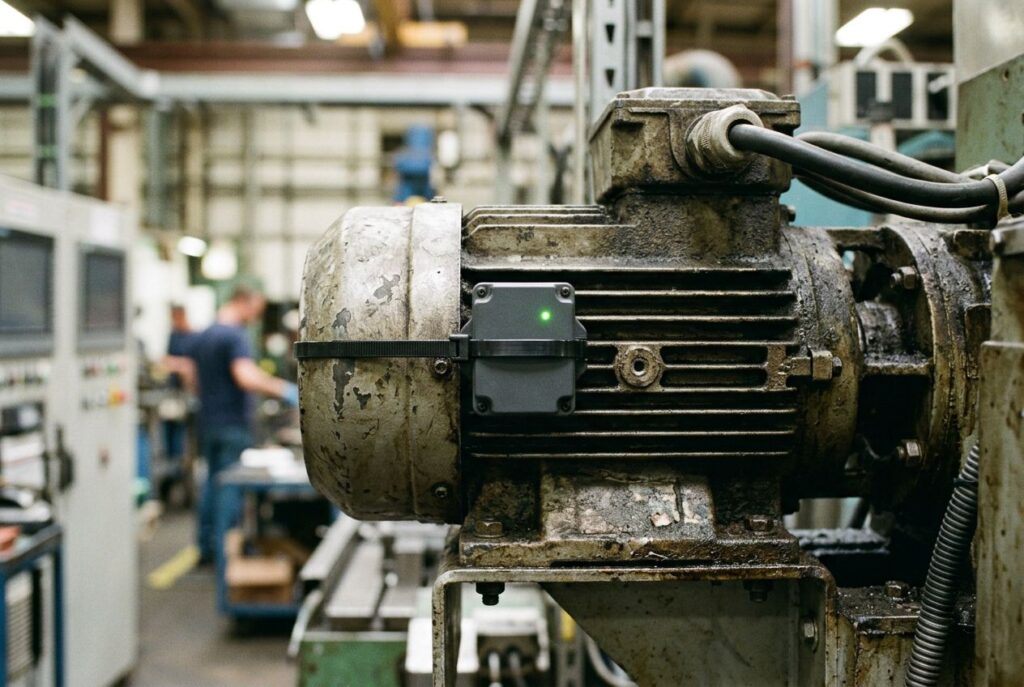
TinyML is machine learning that runs directly on microcontrollers — chips with kilobytes, not gigabytes, of memory and power budgets measured in milliwatts. Instead of sending sensor data to a phone or the cloud for inference, a TinyML model runs on the same tiny chip that reads the sensor, so a device can listen for a wake word, watch for an abnormal vibration, or recognize a hand gesture without a network connection. This guide covers what makes TinyML different from ordinary machine learning, the hardware constraints that shape every design decision, the toolchains people actually use, and the boards to start with.
What is TinyML?
The tinyML Foundation, the industry and research group that coined and popularized the term, defines it as "a fast growing field of machine learning technologies and applications including hardware, algorithms and software capable of performing on-device sensor data analytics at extremely low power, typically in the mW range and below, and hence enabling a variety of always-on use-cases and targeting battery operated devices." The two words that matter most in that definition are on-device and milliwatts: the model runs where the sensor is, not on a server, and the entire system — sensor, chip, and radio, if there is one — has to fit inside a power budget you'd normally associate with a hearing-aid battery, not a laptop.
A 2024 academic survey on the field, "Tiny Machine Learning: Progress and Futures" (Lin et al., MIT), frames the challenge in hardware terms: on a typical microcontroller there is no DRAM, no operating system, SRAM smaller than 256 KB, and flash memory that is read-only at runtime. Deep learning models built for phones or cloud GPUs simply don't fit in that space — they have to be redesigned, compressed, and quantized specifically for it, which is why TinyML is treated as its own discipline rather than "small machine learning."
TinyML vs. edge AI: where the line is
TinyML is a subset of the broader idea of running AI outside the cloud, which we cover in more general terms in our edge AI vs. cloud AI guide. The distinction that matters day to day is the hardware class:
| Criterion | TinyML (microcontroller) | Larger edge AI (SBC / accelerator) |
|---|---|---|
| Typical chip | Cortex-M class MCU (e.g. Nordic nRF52840) | Application processor + NPU/GPU (e.g. NVIDIA Jetson, Hailo) |
| Memory | Under 256 KB SRAM, no DRAM | Gigabytes of RAM |
| Operating system | None (bare metal) or a minimal RTOS | Full Linux |
| Power draw | Milliwatts, often battery-powered for months or years | Watts, usually mains or large battery packs |
| Model examples | Keyword spotting, gesture recognition, anomaly detection | Multi-object detection, pose estimation, small LLMs |
When a project needs more than a microcontroller can give — several camera streams, a heavier vision model, or an on-device language model — it graduates to hardware like a Jetson Orin Nano, a Raspberry Pi paired with a dedicated AI accelerator, or a standalone M.2 AI accelerator card. TinyML stays on the other side of that line on purpose: the whole point is running inference on the same tiny, cheap, low-power chip that's already reading the sensor.
Boards to start with
The Arduino Nano 33 BLE Sense Rev2 is the board most TinyML tutorials and courses default to, and for a concrete reason: it's built around the same nRF52840 whose memory limits are covered in the hardware constraints section below, and it comes with a 9-axis IMU (accelerometer, gyroscope, and magnetometer), a digital microphone, a barometric pressure sensor, and an APDS9960 proximity/gesture sensor already on the board — covering keyword spotting, vibration or motion anomaly detection, and gesture recognition without wiring up a single external sensor.
Disclosure: this article contains affiliate links. If you buy through them we may earn a small commission at no extra cost to you.
![Nano 33 BLE Sense Rev2 [ABX00069]](https://m.media-amazon.com/images/I/51E1wkPPHAL._SL160_.jpg)
- You can build wearables that use artificial intelligence to recognize movements.
- You can build a room temperature monitoring system that can make suggestions or even make changes to the thermostat settings.
- A gesture or voice recognition device can be created using the microphone or the gesture sensor, taking advantage of the AI capabilities of the card.
If the project leans toward Wi-Fi/Bluetooth connectivity or needs an ESP32-class chip specifically (TFLM lists Espressif boards as a supported platform), a XIAO ESP32S3 is a compact, widely-used option for the same class of on-device inference work.

- Powerful MCU Board: Incorporate the ESP32-S3 32-bit, dual-core, Xtensa processor running at up to 240MHz, mounted multiple development ports, Arduino / MicroPython supported
- Outstanding RF performance: supports 2.4GHz WiFi and BLE 5.0 dual wireless communication, support 100m+ remote communication when connected with U.FL antenna
- Elaborate Power Design: lithium battery charge management capability, offer 4 power consumption model which allows for deep sleep mode with power consumption as low as 14μA
- Thumb-sized Compact Design: 21 x 17.5mm, adopting the classic form factor of XIAO, suitable for space limited projects like wearable devices
- Perfect for Production: Breadboard-friendly & SMD design, no components on the back
Boards marketed specifically around TinyML and beginner AI coding, like the UNIHIKER K10, bundle a screen and starter software on top of similar underlying constraints, which can shorten the setup for a first project.

- All-in-One AI Learning Platform: Combines vision AI, offline voice recognition, and TinyML machine learning in one compact device – ideal for STEM education and beginners exploring AI, IoT, and coding.
- Pre-Loaded AI Models & Offline Voice Control: Comes with 4 pre-installed vision AI models (face, pet, QR code, motion) and supports offline speech recognition – no internet needed to start building smart projects.
- Train Your Own AI Models with TinyML: Go beyond built-in features and create custom vision or sensor models for personalized AI projects, enhancing learning and creativity.
- Rich Sensors & Wireless Connectivity: Features a 2MP camera, microphone, speaker, environmental sensors, and dual Wi-Fi/Bluetooth for IoT applications, remote control, and real-time data monitoring.
- User-Friendly with Graphical & MicroPython Coding: Supports drag-and-drop graphical programming (Mind+) and MicroPython, perfect for all skill levels. Includes 2.8" color screen for instant data visualization.
Hardware constraints: RAM, flash, and power
The constraint numbers aren't abstract. Take the Nordic Semiconductor nRF52840, the microcontroller inside several popular TinyML boards: according to Nordic's own product specification, it's an ARM Cortex-M4 running at 64 MHz with 256 KB of RAM and 1 MB of flash. That's the entire budget — model weights, the inference engine, sensor buffers, and any application code all have to share it. Compare that to a laptop or phone with gigabytes of RAM and you can see why a model trained for cloud or mobile deployment has to be re-engineered, not just copied over: it has to be small enough in parameter count and quantized down (typically to 8-bit integers) so both the weights and the working memory it needs during inference fit inside a few hundred kilobytes.
Power is the other constraint, and it's the reason TinyML exists as a category at all. A device that needs to run for months on a coin-cell battery, or indefinitely on energy harvesting, cannot afford a Wi-Fi radio or a beefy processor waking up for every sensor reading. Running the model locally also means no radio transmission is needed for routine decisions, which is where the milliwatt-level power budgets described by the tinyML Foundation's definition (above) come from, and, as MIT's HAN Lab TinyML project notes, it's part of why on-device inference is attractive for privacy: sensitive raw data — audio, video, biometric signals — never has to leave the device.
Toolchains: how models actually get onto a microcontroller
TensorFlow Lite for Microcontrollers (TFLM) is the toolchain most TinyML tutorials start with. Its own repository describes it plainly: "a port of TensorFlow Lite designed to run machine learning models on DSPs, microcontrollers and other devices with limited memory." Its maintainers list official or community-supported ports for Arduino, Espressif's ESP32 boards, the Coral Dev Board Micro, and several other microcontroller families — which is also the most direct, verifiable answer to whether an ESP32 can run TinyML: yes, it's one of TFLM's supported platforms.
The general workflow is: train a normal neural network with a standard framework, convert and quantize it into a compact format, then use a microcontroller-specific inference engine like TFLM to run it on-device. Edge Impulse is the platform most beginners reach for to avoid hand-rolling that pipeline — its own documentation describes it as a place to find "guides, tutorials, API references, and hardware documentation for building edge AI," covering the data collection, training, and deployment steps as one workflow rather than separate tools stitched together by hand.
Common TinyML use cases
The applications section of the MIT survey cited above groups real, published TinyML deployments into a handful of categories, and three of them map directly onto what a board like the Nano 33 BLE Sense Rev2 ships with out of the box:
- Keyword spotting and speech. Wearable and always-on devices use TinyML for keyword spotting, wake-word detection, and speaker verification — the microphone-driven use case that needs the model running locally so the device isn't streaming audio anywhere just to check if it heard its name.
- Anomaly detection. Robots and industrial sensors run TinyML models to flag abnormal vibration, sound, or sensor patterns on the spot, without shipping continuous raw data off-device.
- Gesture and motion recognition. Hand gesture recognition and related human-machine-interface work is called out specifically as a TinyML application area, which is exactly what an onboard IMU and a proximity/gesture sensor like the APDS9960 are built to feed — the same kind of accelerometer and gyroscope data covered in more depth in our IMU sensors guide.
The same survey also lists object/face detection for smart-home devices and object/lane detection for vehicles as active TinyML application areas, though those tend to push harder against the memory ceiling and are more often where a project first bumps into needing more than a microcontroller — the point where the comparison table above starts to matter.
Once the use case is picked, a general-purpose kit built around this class of board is a reasonable starting point rather than assembling parts individually:
- All-in-One AI Learning Platform: Combines vision AI, offline voice recognition, and TinyML machine learning in one compact device – ideal for STEM education and beginners exploring AI, IoT, and coding.
- Pre-Loaded AI Models & Offline Voice Control: Comes with 4 pre-installed vision AI models (face, pet, QR code, motion) and supports offline speech recognition – no internet needed to start building smart projects.
- Train Your Own AI Models with TinyML: Go beyond built-in features and create custom vision or sensor models for personalized AI projects, enhancing learning and creativity.
- Rich Sensors & Wireless Connectivity: Features a 2MP camera, microphone, speaker, environmental sensors, and dual Wi-Fi/Bluetooth for IoT applications, remote control, and real-time data monitoring.
- User-Friendly with Graphical & MicroPython Coding: Supports drag-and-drop graphical programming (Mind+) and MicroPython, perfect for all skill levels. Includes 2.8" color screen for instant data visualization.

- Powerful MCU Board: Incorporate the ESP32 S3 32-bit, dual-core, Xtensa processor chip operating up to 240 MHz, mounted multiple development ports, Arduino / MicroPython supported
- Advanced Functionality: Detachable OV2640 camera sensor for 1600*1200 resolution, compatible with OV3660 camera sensor, integrating additional digital microphone
- Great Memory for more Possibilities: Offer 8MB PSRAM and 8MB FLASH, supporting SD card slot for external 32GB FAT memory
- Outstanding RF performance: Support 2.4GHz Wi-Fi and BLE dual wireless communication, support 100m+ remote communication when connected with U.FL antenna
- Thumb-sized Compact Design: 21 x 17.5mm, adopting the classic form factor of XIAO, suitable for space-limited projects like wearable devices
![Arduino® UNO™ Q 2GB[ABX00162] - Hybrid Board, Qualcomm Dragonwing QRB2210 microprocessor (MPU) & STM32U585 Microcontroller(MCU), AI Vision, Voice, IoT, Robotics, Linux Debian OS, Wi-Fi 5, USB-C](https://m.media-amazon.com/images/I/51cl4xygwGL._SL160_._SL160_.jpg)
- Dual-Brain Hybrid Power: Combines the Qualcomm Dragonwing QRB2210 MPU (Quad-core Arm Cortex-A53 @ 2.0 GHz CPU, Adreno GPU, AI acceleration) and the real-time, low-power STM32U585 MCU for advanced applications like object recognition, voice commands, and motion detection.
- AI & Linux Capabilities: Unlocks AI-powered vision and sound solutions; runs Linux Debian OS for coding in Python and supports the Arduino ecosystem with libraries and Sketches; quick start with Arduino App Lab.
- Advanced Features: Equipped with 2 GB LPDDR4 RAM, 16 GB eMMC built-in storage, ideal to develop in PC-connected mode, running the OS, Python scripts, and basic network services (SSH) without a demanding GUI or heavy multitasking; great for lightweight AI and memory-optimized TinyML applications, needing local storage for basic OS and core libraries. Dual-band Wi-Fi 5 (2.4/5 GHz), Bluetooth 5.1, and high-speed headers for vision, audio, and display peripherals.
- Seamless Expansion & Connectivity: Features the classic UNO form factor for shields compatibility, an 8x13 LED matrix, and a Qwiic connector for easy expansion with Modulino nodes; power and connect via the USB-C connector.
- Intended Use & Development: The perfect platform for prototyping robotics or IoT projects, empowering innovators with a unified development experience to mix Arduino Sketches, Python scripts, and containerized AI models in a single interface.
Frequently asked questions about TinyML
What is TinyML used for?
The published, documented use cases cluster around always-on, battery-powered sensing: keyword spotting and voice wake-words, hand gesture and motion recognition, and anomaly detection in industrial or robotic sensors. What they have in common is that the decision has to happen instantly, locally, and on very little power — sending the raw sensor stream to the cloud for every decision would defeat the purpose.
Can ESP32 run TinyML?
Yes. TensorFlow Lite for Microcontrollers, the most widely used TinyML inference engine, lists Espressif's ESP32 boards among its supported platforms in its own repository, alongside Arduino and several other microcontroller families.
What is the difference between TinyML and machine learning in general?
"Machine learning" covers everything from cloud-scale models with billions of parameters down to the small models that run on a phone. TinyML is the extreme end of that range: models small and efficient enough to run on a microcontroller with well under 256 KB of RAM, no operating system, and a power budget in the milliwatt range — constraints that don't apply to a phone or a server.
Is it worth learning TinyML?
That depends on what you're building and can't be answered with a single verifiable fact, but the shape of the field is: it has an active research community (the survey cited throughout this article is one of several peer-reviewed publications on the topic), dedicated courses from institutions like Harvard, and mature open-source toolchains (TensorFlow Lite for Microcontrollers, Edge Impulse) that didn't exist a decade ago. It's a narrower skill set than general machine learning — closer to embedded systems than data science — which suits people who want to build physical, battery-powered devices rather than software-only models.
Do TinyML models need an internet connection?
No — that's the point. Inference happens on the microcontroller itself, using the model already stored in its flash memory, so a TinyML device can make decisions with no network connection at all. That's also why it's often used where privacy matters: raw sensor data such as audio or motion never has to leave the device to produce a result.
For the bigger picture on when to keep inference local versus send it to the cloud, see our edge AI vs. cloud AI guide; for what happens once a project outgrows a microcontroller, compare the Raspberry Pi AI kits and the Google Coral TPU as the next steps up.
Last update 2026-10-03. Price and product availability may change.
Recommended: