ESP32-S3 AI Camera Module vs ESP32-CAM: What Changes
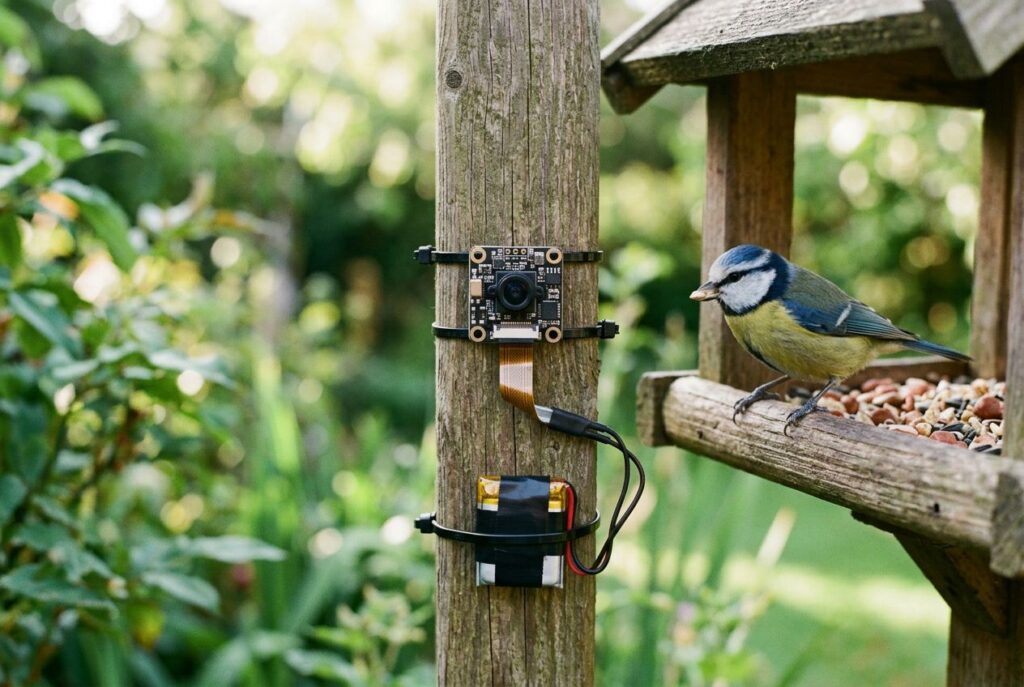
An ESP32-S3 AI camera module pairs Espressif's ESP32-S3 chip — which has hardware vector instructions built for neural-network math that the original ESP32 lacks — with a small image sensor, so an inexpensive board can run face detection or a compact TensorFlow Lite Micro model without sending a single frame to the cloud. The similar-looking "ESP32-CAM" boards use that older, plain ESP32 chip instead, and per Espressif's own current tooling, no longer get first-class support for the newer vision examples. This guide compares what actually changed between the two chip families, what each can realistically run, and how to get from an unboxed board to a working inference.
- ESP32-CAM vs ESP32-S3: what actually changed
- What "AI acceleration" means on the ESP32-S3
- What these boards can actually run
- Camera sensors, and why PSRAM decides what you can capture
- Setup path: from board to first inference
- Choosing a board
- Where these boards run out of runway
- Frequently asked questions about ESP32-S3 AI camera modules
ESP32-CAM vs ESP32-S3: what actually changed
"ESP32-CAM" isn't an Espressif product name. It's the label the maker community gave to a family of third-party boards — AI-Thinker's design is the one most clones follow — built around the original ESP32 chip, a dual-core Xtensa LX6 processor. Boards marketed as "ESP32-S3 AI camera" or "ESP32-S3-CAM" use the newer ESP32-S3 chip instead, a dual-core Xtensa LX7. Both parts are made by Espressif, both top out at 240 MHz, and in a product photo they can look nearly identical — which is exactly why the difference inside the silicon matters more than the label on the box.
Espressif's own datasheets put numbers on the gap. With both cores running at 240 MHz, the plain ESP32 scores 1,079.96 CoreMark; the ESP32-S3 scores 1,329.92 CoreMark at the same clock speed — about 23% more work per cycle. Espressif attributes this to the LX7 core's five-stage pipeline, a 128-bit SIMD unit, and a single-precision floating-point unit, none of which the older LX6 core in the plain ESP32 has. The ESP32-S3 datasheet also lists a dedicated 8-to-16-bit DVP camera interface among its peripherals; the ESP32 datasheet lists no equivalent camera peripheral, even though Espressif markets the ESP32 for "cameras for video streaming" applications. One place the older chip actually wins: internal SRAM. The plain ESP32 has 520 KB against the ESP32-S3's 512 KB — a small, genuine exception to "the S3 is strictly better."
| Criterion | ESP32 (used in "ESP32-CAM" boards) | ESP32-S3 |
|---|---|---|
| CPU | Dual-core Xtensa LX6 | Dual-core Xtensa LX7 |
| Max clock speed | 240 MHz | 240 MHz |
| CoreMark (2 cores @ 240 MHz) | 1,079.96 | 1,329.92 |
| Vector / SIMD instructions | None | 128-bit SIMD, used by ESP-DSP and ESP-NN |
| Floating-point unit | None | Single-precision FPU |
| Internal SRAM | 520 KB | 512 KB |
| Dedicated camera interface | Not listed in the datasheet | 8- to 16-bit DVP camera interface |
| External memory interface | SPI / QSPI | Up to Octal SPI (higher-bandwidth PSRAM/flash) |
That extra silicon is why the cheapest ESP32-CAM boards stay attractive for simple jobs — a live JPEG feed, a doorbell trigger, a time-lapse camera — where no on-device model is involved. Once the goal is running a model on the sensor's own board, the ESP32-S3's acceleration and camera-specific interface stop being a nice-to-have.
Disclosure: this article contains affiliate links. If you buy through them we may earn a small commission at no extra cost to you.

- Dual core: Upgraded ESP32 CAM module equipped with a powerful dual-core processor, 32-bit dual-core CPU with low power consumption. The main frequency is up to 240 MHz, and the computing power is up to 600 DMIPS; integrated 520 KB SRAM, external 4 MB PSRAM.
- Flexible extension: ESP cam supports UART/SPI/I2C/PWM/ADC/DAC and other interfaces. Supports OV7670 and OV2640 cameras, built-in flash.
- Low performance: For ESP32 cam with antennas. Very low power consumption, deep sleep current is as low as 6mA. It is an ultra-small 802.11b/g/n Wi-Fi + BT/BLE module. Supports STA/AP/STA+AP working mode. USB to serial port CH340G
- Easy to use: for ESP32-CAM-MB is a small camera module, with on-board PCB antenna, convenient connection. With the built-in development card and TF card slot, it is easy to set up your project and start working.
- Wide application: OV2640 supports the energy-saving Internet of Things (IoT). The ESP32 module supports image transmission for smart household appliances, wireless monitoring, wireless positioning systems, etc.
What "AI acceleration" means on the ESP32-S3
Espressif describes the feature plainly: the ESP32-S3 "has additional support for vector instructions in the MCU, which provides acceleration for neural network computing and signal processing workloads," reached through two libraries, ESP-DSP and ESP-NN, with the ESP-WHO and ESP-Skainet SDKs built on top of that acceleration. In practice, that means the convolution and matrix-multiply operations that make up most of what a small vision model does run as native 128-bit SIMD instructions instead of being emulated one scalar multiply at a time — the difference between a frame taking tens of milliseconds to process and hundreds.
Espressif's own inference runtime for these chips, ESP-DL, publishes its per-operator benchmark numbers specifically for the ESP32-S3 and the newer ESP32-P4 — not for the plain ESP32. That isn't a marketing choice so much as a reflection of where the vector acceleration and ESP-DL's automatic dual-core operator scheduling actually apply. The framework ships a small model zoo of pre-quantized models — compact classifiers and detectors, including a scaled-down YOLO variant — using 8-bit, 16-bit, or mixed 8/16-bit weights, specifically so a model's parameters fit inside a board's on-chip SRAM or external PSRAM instead of a GPU's gigabytes of VRAM.
What these boards can actually run
Three concrete Espressif projects answer "can it do face detection?" more usefully than any spec sheet:
- ESP-WHO, Espressif's example platform for face detection, face recognition, pedestrian detection, and QR-code recognition, currently lists exactly two supported chip families in its maintained branch: ESP32-S3 (on the ESP32-S3-EYE and ESP32-S3-Korvo-2 dev boards) and the newer ESP32-P4. Its own README says plainly that support for "chip such as esp32 and esp32-s2 ... is not available in this branch currently," and points anyone targeting the plain ESP32 to an old, no-longer-updated v1.1.0 branch. Buy a classic ESP32-CAM board expecting to drop in Espressif's current face-detection example, and it simply won't build against the maintained branch.
- ESP-DL is the inference engine underneath ESP-WHO, and it's also usable directly for a custom model — an image classifier or a small detector — once it's been quantized with Espressif's own ESP-PPQ tool.
- TensorFlow Lite Micro has an official Espressif port, esp-tflite-micro, which ships a person-detection example that flashes straight onto an ESP32-S3-EYE board through Espressif's browser-based launchpad tool — no local build toolchain required just to try it.
None of this makes an ESP32-S3 camera board a substitute for real vision hardware. These are single-model, tightly quantized workloads — "is there a face in this frame," "did a person just walk past" — not open-vocabulary detection or tracking several objects at video frame rates. For that class of workload, the realistic next step is a board with an actual NPU, like the ones compared in our Raspberry Pi AI HAT+ vs Jetson guide, which trades the ESP32's near-zero idle power for real multi-model throughput.

- Docs: github.com/nulllaborg/esp32s3-cam
- 【Pro AI Performance】 ESP32-S3 chip with 8MB PSRAM + 8MB Flash and Vector AI acceleration. With OV3660, delivers smoother video and faster face/object recognition than standard ESP32-CAM.
- 【USB-C Plug & Play】 Integrated Type-C for direct flash and power / charge. No external USB-TTL base or breadboard wiring required. Just plug and play for instant development.
- 【100% Code Compatible】 Seamlessly works with existing ESP32-CAM libraries and Arduino sketches. Zero code migration—instantly upgrade your old projects to the S3 era.
- 【On-baord Antenna】 No extra external antenna required to run. Quickly test your project with easy. Provide addtional IPEX socket to install external antenna if you need specific signals, manually change the 0Ω resistor requirerd.
- 【Industrial Grade Stability】 Optimized thermal design for 24/7 streaming. Features dual LED flash and Micro-SD slot (up to 32GB) for high-reliability local video recording.
Camera sensors, and why PSRAM decides what you can capture
Neither chip has a built-in image sensor — the ESP32 or ESP32-S3 only provides the interface a sensor plugs into. Espressif's own camera driver, esp32-camera, lists ESP32, ESP32-S2, and ESP32-S3 as its supported chips, and documents which sensors it drives on them:
| Sensor | Max resolution | Typically found on |
|---|---|---|
| OV2640 | 1600 × 1200 | Classic ESP32-CAM (AI-Thinker-style) boards |
| OV3660 | 2048 × 1536 | Newer ESP32-S3 camera boards |
| GC2145 | 1600 × 1200 | Some ESP32-S3 boards |
The same documentation states a limit that matters more than any resolution figure: "except when using CIF or lower resolution with JPEG, the driver requires PSRAM to be installed and activated." Frames move through the chip's I2S peripheral into DMA-managed buffers, and anything past a postage-stamp JPEG needs that external RAM to hold them. That's why a board's PSRAM size, not just its camera sensor, decides whether it can feed a detection model at all. Espressif's own module-naming convention spells this out on paper: on an ESP32-S3-WROOM-1 module, "N16R8" means 16 MB of flash and 8 MB of Octal-SPI PSRAM — the same naming shorthand you'll see on plenty of board listings.
Setup path: from board to first inference
The fastest way to see a frame is also the least code: Espressif's esp32-camera driver needs no extra installation when you're using the Arduino-ESP32 core, so the component's own bundled example — which captures frames straight from the sensor — runs with nothing to set up beyond selecting the right board. The same driver works under ESP-IDF and PlatformIO, where PSRAM has to be turned on explicitly in menuconfig (or set directly in sdkconfig) before it will capture anything larger than a postage-stamp JPEG.
Getting to an actual detection model means moving to ESP-IDF: cloning ESP-WHO or esp-tflite-micro, selecting the matching board target, and building with the toolchain — or, for the person-detection example specifically, flashing a pre-built binary straight from the browser through Espressif's launchpad tool without installing anything locally. Either path, the most common first failure isn't the model, it's the pin mapping: the driver's own reference example hand-assigns every camera pin (clock, data lines, sync signals) for one specific board's wiring, and a generic ESP32-S3-CAM board that isn't one of Espressif's own reference designs, like the ESP32-S3-EYE, needs each of those pin numbers edited to match its own layout before anything captures a usable frame.
Choosing a board
For learning the classic camera-to-web-server pattern, a plain ESP32-CAM board is the cheapest way in — it just won't run Espressif's current face-detection examples without extra work. For anything that needs on-device inference, look for three things on the listing: the ESP32-S3 chip specifically, not plain "ESP32"; a stated PSRAM size (8 MB is the common figure on current boards); and a camera sensor from the supported list above. Starter-kit-style boards that add a microSD slot are worth the extra cost mainly for convenience — saving captured frames locally — not because they run a model any faster than a bare ESP32-S3 camera board with the same chip and PSRAM.

- Powerful MCU Board: Incorporate the ESP32 S3 32-bit, dual-core, Xtensa processor chip operating up to 240 MHz, mounted multiple development ports, Arduino / MicroPython supported
- Advanced Functionality: Detachable OV2640 camera sensor for 1600*1200 resolution, compatible with OV3660 camera sensor, integrating additional digital microphone
- Great Memory for more Possibilities: Offer 8MB PSRAM and 8MB FLASH, supporting SD card slot for external 32GB FAT memory
- Outstanding RF performance: Support 2.4GHz Wi-Fi and BLE dual wireless communication, support 100m+ remote communication when connected with U.FL antenna
- Thumb-sized Compact Design: 21 x 17.5mm, adopting the classic form factor of XIAO, suitable for space-limited projects like wearable devices
- Docs: github.com/nulllaborg/esp32s3-cam
- 【Pro AI Performance】 ESP32-S3 chip with 8MB PSRAM + 8MB Flash and Vector AI acceleration. With OV3660, delivers smoother video and faster face/object recognition than standard ESP32-CAM.
- 【USB-C Plug & Play】 Integrated Type-C for direct flash and power / charge. No external USB-TTL base or breadboard wiring required. Just plug and play for instant development.
- 【100% Code Compatible】 Seamlessly works with existing ESP32-CAM libraries and Arduino sketches. Zero code migration—instantly upgrade your old projects to the S3 era.
- 【On-baord Antenna】 No extra external antenna required to run. Quickly test your project with easy. Provide addtional IPEX socket to install external antenna if you need specific signals, manually change the 0Ω resistor requirerd.
- 【Industrial Grade Stability】 Optimized thermal design for 24/7 streaming. Features dual LED flash and Micro-SD slot (up to 32GB) for high-reliability local video recording.

- Dual-core processor: The ESP32 module is based on the powerful ESP32-S3-WROOM N16R8 module and is equipped with a dual-core 32-bit LX7 processor. Its excellent AI computing performance, real-time processing capabilities, and low power consumption make it ideal for image recognition, edge AI, and complex IoT applications
- Integrated 2-megapixel OV3660 camera: Built-in OV3660 camera to capture clear images and stream video in real time. Perfect for smart surveillance, face recognition, and AI-based computer vision projects. It is the preferred solution for DIY makers and professionals to build camera-enabled IoT systems
- Dual Type-C ports for OTG and serial debugging: Designed with two USB Type-C interfaces - one supports USB OTG for host/device functions, and the other provides TTL serial for easy programming and debugging
- Shared antenna: Supports IEEE 802.11b/g/n Wi-Fi (2.4GHz) and Bluetooth 5 (LE and Mesh), using shared antennas to optimize wireless performance. Enhanced 2 Mbps PHY and long-distance communication (Coded PHY) ensure stable multitasking in harsh environments
- Multi-scenario applications: The ESP32 S3 development board maintains high stability even at high temperatures, making it ideal for industrial environments, educational purposes, and AI-driven projects. It is a versatile choice for robots, smart devices, and machine vision in lab or field applications
Where these boards run out of runway
An ESP32-S3 camera board's ceiling is set by the same numbers that make it cheap: a few hundred kilobytes of SRAM, single-digit megabytes of PSRAM, and one CPU doing double duty for Wi-Fi, the camera pipeline, and inference. That's enough for one quantized model watching one camera at a modest frame rate — not for running several models at once, not for high-resolution video, and not for anything resembling a language model. When a project needs more than that — multiple camera streams, larger models, real GPU-class throughput — the realistic options move to a Raspberry Pi with its own AI Camera, a Pi paired with an AI HAT+, or an NVIDIA Jetson Orin Nano; the trade-offs between those platforms are covered in our edge AI vs cloud AI guide.
Frequently asked questions about ESP32-S3 AI camera modules
Can the ESP32-S3 run AI?
Yes, within limits. The chip has hardware vector (SIMD) instructions built for neural-network math, and Espressif's own ESP-DL and ESP-WHO software run small, quantized vision models — face detection, person detection, simple classifiers — directly on the camera board. It isn't capable of large or general-purpose models; think one tightly quantized model, not a vision-language system.
Does the ESP32-S3 have a camera?
Not built in. The ESP32-S3 chip provides a dedicated 8-to-16-bit DVP camera interface, but the actual image sensor is a separate part on the board — commonly an OV2640, OV3660, or GC2145 — that comes pre-attached on a camera-specific dev board.
What are the downsides of using an ESP32-CAM board?
The plain ESP32 inside classic ESP32-CAM boards has no vector/SIMD instructions and no floating-point unit, so it's slower per cycle at the math a vision model needs. Espressif's current ESP-WHO branch — the one with the maintained face-detection examples — doesn't build for the plain ESP32 at all; that requires an old, unmaintained release. Most of these boards also have no native USB, so programming them needs a separate USB-to-serial adapter.
Can an ESP32 run a camera?
Yes — Espressif's esp32-camera driver explicitly supports the plain ESP32 alongside the ESP32-S2 and ESP32-S3, and it's the same driver bundled with the Arduino-ESP32 core. It captures fine for streaming or basic image capture; it just isn't the chip Espressif's newer AI examples target.
Do ESP32 camera boards need PSRAM for AI projects?
Effectively yes. Espressif's camera driver documentation states that, except at CIF resolution or lower with JPEG, it requires PSRAM to be installed and active — and a detection model needs frames larger than that to be useful. Check a board's PSRAM size before buying, not just its camera sensor.
Want the bigger picture on when a self-contained chip like this is the right call versus offloading to a bigger device? Start with our edge AI vs cloud AI guide, then compare boards in our Raspberry Pi AI kits guide.
Last update 2026-10-04. Price and product availability may change.
Recommended: